

AI agents are moving into the business processes that organizations already manage in Microsoft Dynamics 365.
Across sales, customer service, finance, field service, project operations, supply chain management, marketing, and Business Central, Microsoft is introducing agents designed to research information, coordinate activities, automate defined tasks, and support decisions within existing workflows. Some agents are available within Dynamics 365 applications, while others are currently offered in paid public preview.
That distinction matters. The opportunity is not simply to add another AI interface. It is to identify business processes where an agent can take on a defined part of the work while Dynamics 365 continues to provide the application, business data, and process context.
Here are several areas where that model is already taking shape.
Sales: qualify, research, prioritize, and close opportunities
Sales teams spend significant time researching leads and opportunities before deciding where to focus.
Dynamics 365 Sales includes three prebuilt agents that address different parts of that process. The Sales Qualification Agent researches internal and external information, engages leads with personalized emails and follow-ups, identifies buying intent, and moves qualified leads toward sellers. The Sales Opportunity Agent continuously researches opportunities, identifies risks, prioritizes opportunities, and recommends actions. The Sales Research Agent lets sellers interact with sales data using natural language to better understand performance across teams, territories, and product portfolios.
Microsoft also lists a Sales Close Agent in paid public preview. It focuses on negotiation and closing, identifies and ranks high-value deals, flags potential blockers, recommends actions, and can complete low-complexity transactions without manual intervention.
Where is the value?
The sales process starts to move from AI that only surfaces information toward agents that can support specific stages of execution: qualification → opportunity research → prioritization → closing.
For organizations assessing AI in sales, this provides a practical starting point: identify the stages where sellers spend time researching, interpreting signals, or performing repeatable actions.
Customer service: manage cases, knowledge, intent, and quality
Customer service offers another clear set of agent use cases.
The Dynamics 365 Customer Service Case Management Agent can create cases, update details, follow up with customers, and support case closure. The Customer Intent Agent analyzes previous interactions to discover customer intents and build an intent library.
Knowledge creation is another area. The Knowledge Management Agent helps service teams generate knowledge assets from case information, reducing the work required to synthesize case data manually. The Quality Evaluation Agent evaluates cases and conversations and provides quality scores and detailed evaluation insights to supervisors.
Dynamics 365 Contact Center extends the pattern further. Its Customer Assist Agent combines autonomous self-service with real-time assistance for service representatives and can proactively contact customers. Microsoft also documents customer intent, knowledge management, and quality-assurance agents for Contact Center.
Rather than viewing customer-service AI as a single chatbot initiative, organizations can look at several distinct processes:
customer intent → case management → representative assistance → knowledge → quality evaluation
That creates multiple points where an agent could become part of the service workflow.
Field service: respond to changing schedules
Field service is highly dependent on operational conditions that can change throughout the day.
Microsoft lists the Scheduling Operations Agent for Dynamics 365 Field Service in paid public preview. The agent is designed to help dispatchers optimize technician schedules as conditions change during the day.
This points to an important class of agent use cases: continuous operational coordination.
Instead of evaluating AI only against static administrative tasks, organizations can look for business processes where conditions change frequently and teams repeatedly need to reassess what should happen next.
For field service organizations, scheduling is one such process.
Finance: make reconciliation more efficient
Finance teams have agent opportunities around structured, repeatable processes that combine data matching with exception handling.
The Account Reconciliation Agent for Dynamics 365 Finance, currently listed in paid public preview, supports period-end close by matching ledger entries, flagging discrepancies, and recommending resolution steps. Microsoft positions it as a way to support timely, compliant financial statements with fewer manual fixes.
This illustrates a useful pattern for financial AI:
match → identify exception → recommend resolution → human review
It is a different model from simply asking an AI assistant a finance question. The agent is associated with a defined accounting process and a specific operational outcome.
Supply chain: respond earlier to supplier changes
Procurement teams regularly have to respond to supplier changes that affect purchase orders and supply commitments.
Microsoft’s Procurement Agent for Dynamics 365 Supply Chain Management, currently in paid public preview, is designed to help procurement and sourcing teams coordinate supplier communications, assess the operational impact of supplier updates, identify response options, and surface potential issues earlier.
That makes procurement another strong agent scenario.
The agent is not isolated from the business process. Supplier changes are considered in the context of purchase orders and operational plans, helping teams make more informed procurement decisions.
For supply chain leaders, this suggests a useful question:
Where does the team repeatedly monitor changes, assess their impact, and determine the next action?
Those processes are natural candidates to evaluate for agent-assisted work.
Project operations: reduce administrative work around time and expenses
Project-based businesses generate significant transactional work around expenses, time entry, and approvals.
Microsoft lists three Dynamics 365 Project Operations agents in paid public preview.
The Expense Agent processes receipts, creates expense lines, and generates reports with minimal user intervention. The Time Entry Agent uses reminders and context to help employees record project hours. The Activity Approvals Agent uses policy-document text to classify submitted time, expense, and material records and streamline approvals.
Together, they illustrate another strong agent pattern:
capture → classify → validate → approve
These are often small activities individually, but they form part of larger project, billing, payroll, and financial processes.
Business Central: connect agents to transactional workflows
Dynamics 365 Business Central shows how agents can operate inside transactional processes.
The Sales Order Agent analyzes customer requests received by email, identifies customers in Business Central, asks for clarification when information is missing, checks item availability, and follows up with a sales quote.
The Payables Agent captures, validates, and matches invoices against purchase orders and receipts. It can route invoices to approvers using configurable rules and provides dashboards and alerts for outstanding payables.
These examples show agents working across multiple steps rather than addressing one isolated task.
For business leaders, that suggests evaluating the complete process, not only individual automation opportunities.
Customer journeys: move from manual configuration toward agent-assisted orchestration
Agent use cases are also emerging in marketing.
The Journey Creation Agent for Dynamics 365 Customer Insights, currently in paid public preview, can take a marketing goal described in natural language and create the initial journey structure, including flow, timing, and branching logic.
The Outreach Optimization Agent analyzes historical engagement and selects higher-engagement email send times. When historical engagement data is unavailable, Microsoft states that it uses a fallback strategy while honoring quiet-time settings and contact-point consent.
These capabilities move AI closer to campaign execution:
define the goal → structure the journey → optimize outreach
Across these use cases, a common pattern emerges: AI agents can help teams move from understanding information to making decisions, taking action, and continuously improving outcomes.
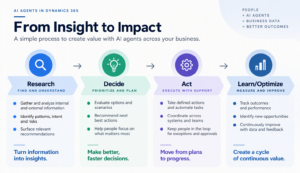
From isolated AI use cases to agent-enabled business processes
Taken together, the Dynamics 365 examples suggest a useful way to think about enterprise agents.
The highest-value starting point may not be: “Where can we deploy an AI agent?”
A better question is:
“Which business process contains enough repetitive research, coordination, classification, exception handling, or transactional work to benefit from agent assistance?”
The Dynamics 365 examples provide several patterns organizations can assess:
- Research and prioritize: Sales
- Understand and respond: Customer Service and Contact Center
- Schedule and coordinate: Field Service
- Match and reconcile: Finance
- Monitor and respond to changes: Supply Chain Management
- Capture and approve: Project Operations
- Process transactions: Business Central
- Build and optimize journeys: Customer Insights
This is where the agent discussion becomes a business-process discussion rather than an AI feature discussion.
What should organizations consider before adopting Dynamics 365 AI agents?
Three considerations stand out from Microsoft’s licensing guide.
First, availability differs. Some Dynamics 365 agents are documented as prebuilt agents within applications, while several others described above are listed under Paid Public Preview. Microsoft states that preview pricing, business models, services, branding, features, functionality, and availability may change before general availability.
Second, licensing matters. Microsoft states that users must have the respective Dynamics 365 application license to use Microsoft-built agents. Copilot Credits also apply to agent usage in specified scenarios. For example, Dynamics 365 Sales Premium and Dynamics 365 Customer Service Premium each include 1,000 Copilot Credits per user per month for specified Dynamics 365 agents, tools, or eligible custom-agent scenarios.
Third, agents can be extended. Microsoft states that Dynamics 365 agents in its paid public preview can be enhanced using Copilot Studio capabilities including agent flows, AI tools, custom actions, REST APIs, tenant graph grounding, autonomous actions, and generative orchestration.
These factors make agent adoption both a business-process decision and an architecture and licensing decision.
Start with the process, then choose the agent
Dynamics 365 shows AI agents moving into the operational workflows where work already happens.
The practical opportunity is to identify processes with clear boundaries, repetitive work, relevant business context, and points where human judgment should remain part of the process.
Start with the workflow. Identify where people spend time gathering information, checking exceptions, coordinating activity, or completing routine transactions. Then determine whether a Dynamics 365 agent, automation, Copilot capability, or another approach is the right fit.
For organizations already running Dynamics 365, that approach can turn the agent conversation from “Where can we use AI?” into the more useful question:
“Which business processes should we improve first?”