
The cost of keeping old systems running eventually outweighs the cost of replacing them. Disconnected scheduling tools, paper-based work orders, and customer data spread across systems that don’t talk to each other slow response times, inflate costs, and leave leadership without a single view of how service is actually performing.
Why Legacy Systems Cost More the Longer They Run
Four conditions push service organizations toward this point.
Data lives in silos. Scheduling runs in one system, dispatch in another, and work order history somewhere else entirely. Nobody gets a complete picture of a job without pulling from three places first.
Technical debt builds underneath it. Legacy platforms weren’t built to integrate with modern enterprise resource planning (ERP) systems or Internet of Things (IoT) infrastructure, so every new data source becomes another manual workaround instead of a connection.
Without smarter systems, the only way to handle more volume is to add headcount in the same proportion, because the systems doing the scheduling and dispatch can’t absorb more work on their own.
And the whole posture stays reactive. Response times slip, service level agreement (SLA) breaches climb, and customer satisfaction drops, not because technicians are underperforming, but because the systems around them were never built to keep pace with demand.
Six Capabilities That Unify Field Service Operations
A modern field service platform closes these gaps by putting scheduling, dispatch, and work order management on one connected system instead of three disconnected ones.
One system for the full work order lifecycle
A core Dynamics 365 Field Service implementation manages a work order from intake through completion, so the record doesn’t fragment across separate scheduling and dispatch tools along the way.
Dispatch decisions handled automatically, not manually
Resource Scheduling Optimization assigns technicians to jobs automatically, weighing skill, availability, and priority in real time instead of leaving every assignment to a dispatcher working from a static schedule.
AI guidance at the point of service
Copilot AI gives technicians guided assistance and automatic summarization while they’re on the job, so less time goes into paperwork and more goes into the actual work.
Field work that doesn’t stop when the connection does
Mobile offline capability keeps technicians working through low-connectivity environments, so a weak signal in the field doesn’t delay a work order until someone’s back within range.
Work orders that generate themselves from equipment signals
IoT-triggered automation, powered by Azure IoT Hub, creates work orders directly from equipment signals, closing the gap between a developing issue and a scheduled fix.
One connected layer to the rest of the business
An integration layer connects Field Service to existing ERP, customer relationship management (CRM), and back-office systems, so service data doesn’t sit isolated from the rest of the business.
A Dispatcher’s Day Before and After Automation
Without a unified platform, a dispatcher works from a schedule that doesn’t reflect real-time technician status. A job gets assigned to a technician who’s already on another call. The technician arrives late, or not at all, and the SLA clock keeps running until it breaches.
With Resource Scheduling Optimization and Copilot AI in place, dispatch adjusts automatically as technician status changes. Jobs route to the closest available technician with the right skill set the moment a slot opens. A weak connection at the job site doesn’t delay the work order either, since mobile offline capability keeps the technician working through the gap.
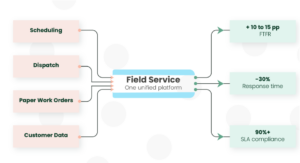
Organizations that make this shift have seen first-time fix rate (FTFR) improve by 10 to 15 percentage points, response time drop by 30%, and SLA compliance reach 90% or higher.
The Dynamics 365 Capabilities Behind a Unified Field Service Platform
The unification runs through the platform itself. Dynamics 365 Field Service manages the full work order lifecycle. Resource Scheduling Optimization automates dispatch. Copilot AI supports technicians on the job. Mobile offline capability keeps field work moving without a live connection. Azure IoT Hub triggers work orders directly from equipment signals. And an integration layer ties all of it back to the ERP, CRM, and back-office systems the rest of the business already runs on.
The Case for Modernizing Field Service Now
A dispatcher makes roughly 200 decisions a day. AI can make most of them automatically and improve the ones it still hands off to a person. Every minute a technician spends offline or waiting on a disconnected system is time and revenue that don’t come back.
Modernizing has already stopped being a choice for most service organizations. The real variable is how many more years of workarounds they pay for first.
OwlSure’s Field Service practice helps organizations consolidate scheduling, dispatch, and work order management onto Dynamics 365 Field Service, replacing fragmented operations with one connected, measurable system, from the first customer call to the closed work order.